How to Build a RAG and MCP Solution Using the Laravel AI SDK
Adding AI chat to an existing application is no longer limited to sending a prompt to a language model. A useful business assistant needs access to company knowledge, current application data and controlled actions.
Adding AI chat to an existing application is no longer limited to sending a prompt to a language model. A useful business assistant needs access to company knowledge, current application data and controlled actions.
In this guide, we will examine how to build a prototype that combines:
A chat interface inside a Laravel extranet
Approximately 200 PDF documents
Retrieval-Augmented Generation, known as RAG
Model Context Protocol, known as MCP
DeepSeek or another supported language model
The official Laravel AI SDK
The official Laravel MCP package
The result will be an assistant that can answer questions from private documents, retrieve live information and interact with approved business tools.
What Are RAG and MCP?
RAG and MCP solve different problems.
RAG provides knowledge. It allows the application to find relevant information inside documents and supply it to the language model.
MCP provides capabilities. It allows the AI agent to access tools, APIs and live application data through a standard protocol.
For example, a user might ask:
How many days of annual leave do employees receive?
The agent searches the indexed PDF documents, retrieves the relevant policy and generates an answer with a citation.
Another user might ask:
Find customer ABC Limited and show me their open invoices.
This requires current application data. The agent can use an internal Laravel tool or connect to an MCP server that exposes customer and invoice functionality.
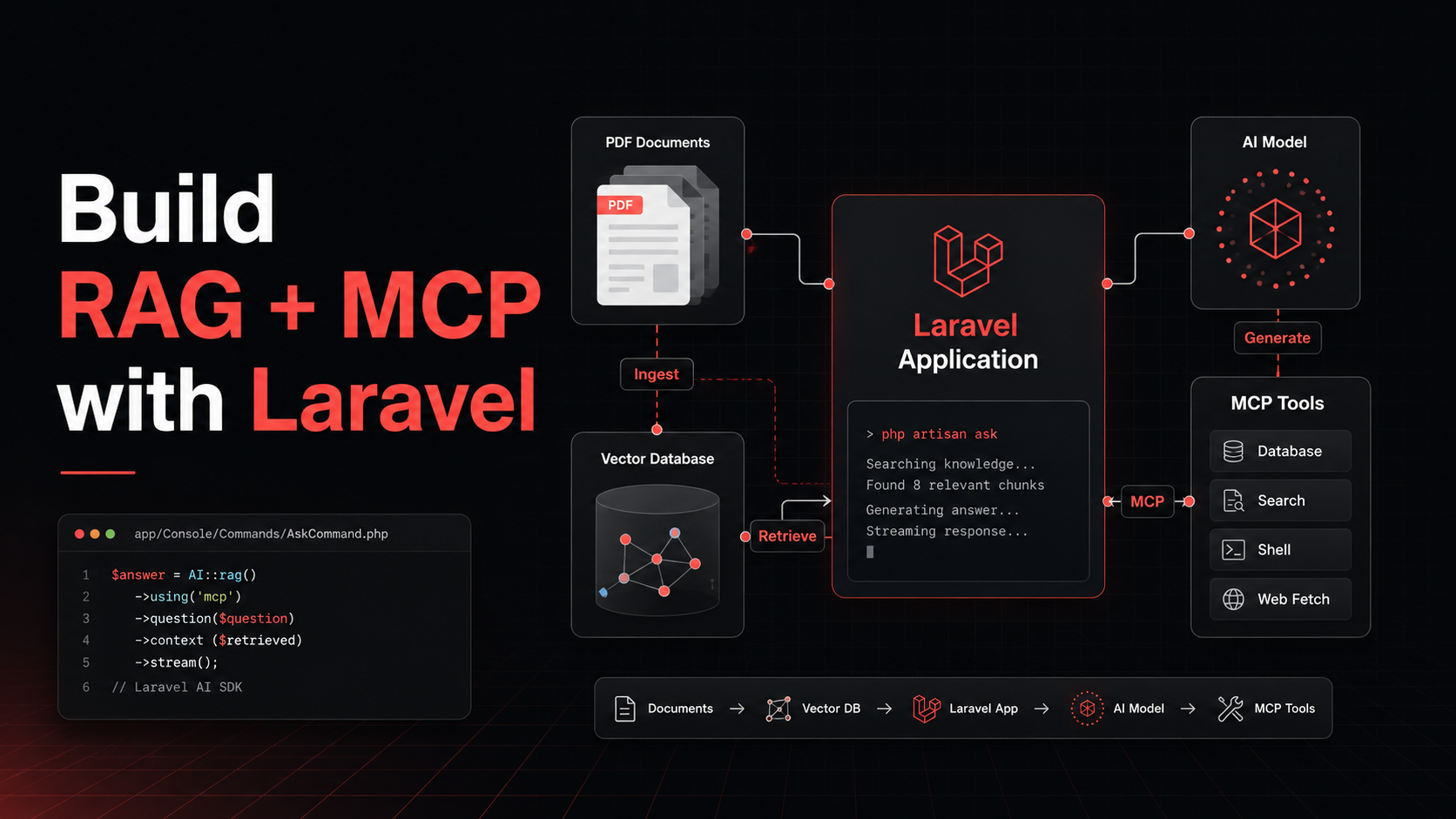
The complete architecture looks like this:
User
  ↓
Laravel chat interface
  ↓
Laravel AI agent
  ├── RAG document search
  ├── Laravel application tools
  ├── External MCP tools
  └── DeepSeek or another language model
  ↓
Answer with citations and tool results
Step 1: Install the Laravel AI SDK
The Laravel AI SDK provides a unified API for agents, prompts, conversations, embeddings, tools, reranking, streaming and multiple AI providers.
Install it with Composer:
composer require laravel/ai
Publish its configuration and migrations:
php artisan vendor:publish \
    --provider="Laravel\Ai\AiServiceProvider"
Run the migrations:
php artisan migrate
Add the required provider credentials to the environment:
DEEPSEEK_API_KEY=your-api-key
OPENAI_API_KEY=your-api-key
The generation model and embedding model do not need to use the same provider. DeepSeek can generate answers while OpenAI, Cohere or a local model generates document embeddings.
The official SDK documentation is available in the Laravel AI SDK documentation.
Step 2: Create the AI Agent
The agent coordinates the complete process. It receives the question, decides whether it needs document knowledge or a tool, and generates the final response.
Create an agent:
php artisan make:agent ExtranetAssistant
A simplified agent might look like this:
<?php

namespace App\Ai\Agents;

use App\Models\DocumentChunk;
use Laravel\Ai\Contracts\Agent;
use Laravel\Ai\Contracts\HasTools;
use Laravel\Ai\Promptable;
use Laravel\Ai\Tools\SimilaritySearch;

class ExtranetAssistant implements Agent, HasTools
{
    use Promptable;

    public function instructions(): string
    {
        return <<<'PROMPT'
        You are an assistant inside a private company extranet.

        Use document search when the user asks about company
        policies, procedures or reference materials.

        Answer only from the available information.

        If the documents do not contain the answer, clearly say so.

        Include the document name and page number when using
        document information.

        Never expose information the authenticated user is not
        authorized to access.
        PROMPT;
    }

    public function tools(): iterable
    {
        return [
            SimilaritySearch::usingModel(
                DocumentChunk::class,
                'embedding'
            ),
        ];
    }
}
The instructions define the agent’s behaviour. Tools give it access to application functionality.
The agent does not automatically know the content of the PDFs. They must first be extracted, divided into chunks and indexed.
Step 3: Extract Content From the PDFs
PDF files are difficult because their internal structures vary.
Some contain selectable text. Others are scanned images that require OCR. Tables, headers, footers and multi-column layouts can also create incorrect output.
Useful extraction tools include:
pdftotextPyMuPDF
pdfplumberApache Tika
OCRmyPDF
Tesseract
Mistral OCR
AWS Textract
Google Document AI
A practical prototype can use pdftotext or PyMuPDF for normal documents and OCRmyPDF for scanned files.
The extraction result should preserve page boundaries:
{
    "document_id": 24,
    "page": 7,
    "text": "The extracted content of page seven..."
}
Page information must be preserved during every processing stage. Without it, the final assistant cannot produce reliable citations.
Step 4: Clean the Extracted Text
Raw PDF extraction normally contains unnecessary content:
Repeated headers
Repeated footers
Standalone page numbers
Broken words
Duplicate paragraphs
Incorrect line breaks
Navigation elements
Create a cleanup service that:
Normalizes whitespace.
removes repeated headers and footers.
repairs words broken across lines.
removes duplicate content.
identifies headings.
preserves page numbers.
records extraction warnings.
Do not modify the original PDF. Store the cleaned text separately.
Step 5: Divide the Documents Into Chunks
An entire PDF is too large and too general to use as one embedding. The extracted content must be divided into smaller sections called chunks.
A good initial configuration is:
Chunk size: 600 to 900 tokens
Overlap: 80 to 150 tokens
Minimum size: 100 tokens
The overlap helps preserve context when a sentence or explanation crosses a chunk boundary.
Each chunk should include metadata:
{
    "document_id": 24,
    "title": "Employee Handbook",
    "page": 12,
    "section": "Annual Leave",
    "tenant_id": 4,
    "content": "Full-time employees receive..."
}
Recursive chunking is a practical starting approach. Split the content by:
Headings
Paragraphs
Sentences
Token limit
This produces more natural chunks than dividing the text every fixed number of characters.
Step 6: Generate Embeddings
An embedding is a numerical representation of text. Content with a similar meaning produces vectors that are located close to each other.
For example:
annual leave allowance
holiday entitlement
number of paid vacation days
These phrases use different words but have similar meanings.
Laravel AI SDK can generate embeddings:
use Laravel\Ai\Embeddings;
use Laravel\Ai\Enums\Lab;

$response = Embeddings::for([
    'Full-time employees receive 25 days of annual leave.',
])
    ->dimensions(1536)
    ->generate(
        Lab::OpenAI,
        'text-embedding-3-small'
    );
Embedding generation should run through queued jobs because processing hundreds or thousands of chunks may take time.
A suitable queue pipeline is:
Bus::chain([
    new ExtractDocumentJob($document),
    new CleanDocumentJob($document),
    new ChunkDocumentJob($document),
    new GenerateEmbeddingsJob($document),
])->dispatch();
Laravel Horizon can monitor these jobs and make failed processing easier to diagnose.
Step 7: Store the Vectors
The easiest storage option depends on the existing application.
If the extranet already uses PostgreSQL, use PostgreSQL with the pgvector extension.
Schema::ensureVectorExtensionExists();

Schema::create('document_chunks', function (Blueprint $table) {
    $table->id();
    $table->foreignId('document_id')->constrained();
    $table->unsignedInteger('page_number')->nullable();
    $table->string('section')->nullable();
    $table->longText('content');
    $table->vector('embedding', dimensions: 1536);
    $table->json('metadata')->nullable();
    $table->timestamps();
});
If the existing Laravel application uses MySQL, moving the complete system to PostgreSQL may not be justified. In that situation, a dedicated vector database such as Qdrant is a strong option.
Possible vector stores include:
PostgreSQL with pgvector
Qdrant
Pinecone
Weaviate
Elasticsearch or OpenSearch
Redis Vector Search
Milvus
For 200 PDF documents, PostgreSQL with pgvector or Qdrant should be more than sufficient.
Step 8: Retrieve Relevant Content
When the user submits a question, the application creates an embedding for that question and searches for similar document chunks.
The process is:
Question
→ question embedding
→ vector similarity search
→ top 15 chunks
→ reranking
→ best 5 chunks
→ language model
The initial search should retrieve more chunks than will eventually be sent to the model. A reranker can then evaluate them more accurately.
Laravel AI SDK supports reranking:
use Laravel\Ai\Reranking;

$response = Reranking::of($documents)
    ->limit(5)
    ->rerank($question);
This is useful because vector similarity finds conceptually related content, while reranking identifies which result best answers the exact question.
For better results, combine vector and keyword search. This is known as hybrid retrieval.
Vector search works well for meaning:
holiday allowance
annual leave entitlement
Keyword search is better for exact identifiers:
HR-POLICY-204
INV-2026-00482
Step 9: Add MCP to the Solution
Install Laravel MCP:
composer require laravel/mcp
php artisan vendor:publish --tag=ai-routes
Laravel can use MCP in two directions.
Laravel as an MCP Client
The Laravel agent can connect to an existing MCP server and use its tools.
use Laravel\Mcp\Client;

public function tools(): iterable
{
    return [
        ...Client::web('https://client.example.com/mcp')
            ->withToken($token)
            ->tools(),
    ];
}
This could provide access to:
A CRM
SharePoint
Google Drive
An accounting platform
A ticketing system
Another internal application
The Laravel AI SDK automatically presents these MCP tools to the agent as callable tools.
Laravel as an MCP Server
Laravel can also expose its own functionality to external AI clients.
Create a server:
php artisan make:mcp-server ExtranetServer
Register it in routes/ai.php:
use App\Mcp\Servers\ExtranetServer;
use Laravel\Mcp\Facades\Mcp;

Mcp::web('/mcp/extranet', ExtranetServer::class)
    ->middleware('auth:sanctum');
The server can expose tools such as:
search_documents
find_customer
list_open_invoices
create_support_ticket
get_order_status
Read the complete implementation details in the official Laravel MCP documentation.
Step 10: Understand MCP Tools, Resources and Prompts
MCP defines three important primitives.
Tools
Tools perform actions or execute queries.
Examples:
find_customer
search_documents
create_ticket
get_invoice
Resources
Resources provide information that an AI client can read.
Examples:
company://policies/security
customer://123/profile
product://catalogue/current
Prompts
Prompts provide reusable workflows.
Examples:
investigate_support_request
prepare_customer_summary
explain_company_policy
A simple distinction is:
Perform or query something: Tool
Read contextual information: Resource
Run a reusable AI workflow: Prompt
Step 11: Connect RAG and MCP
There are two sensible approaches.
Keep RAG Inside Laravel
The Laravel agent directly searches the document_chunks table or Qdrant.
Use this when:
The PDFs belong only to this extranet.
Laravel already controls users and permissions.
The document search is not required by other applications.
The prototype needs to remain simple.
Expose RAG Through MCP
Create an MCP tool called search_client_documents.
{
    "query": "What is the annual leave allowance?",
    "limit": 10
}
The result might be:
{
    "results": [
        {
            "document": "Employee Handbook",
            "page": 12,
            "content": "Employees receive 25 days...",
            "score": 0.92
        }
    ]
}
Use this approach when:
Several applications need the same knowledge base.
The RAG service must be reusable.
Document processing runs as a separate service.
Demonstrating MCP is a central prototype requirement.
For a single Laravel extranet, keeping RAG inside Laravel is usually the simpler starting point.
Step 12: Implement Document Permissions
Permissions must be applied during retrieval, before content is sent to the language model.
Useful metadata fields include:
tenant_id
organisation_id
department_id
document_id
access_group
visibility
document_status
A retrieval query should only search chunks the current user can access.
Never search every document and instruct the model to hide restricted information. The language model is not a security layer.
The same rule applies to MCP tools. Every tool must:
Authenticate the user.
authorize the requested action.
validate all arguments.
restrict returned fields.
record an audit log.
require confirmation for sensitive changes.
Sanctum is suitable for an internal prototype. OAuth 2.1 with Laravel Passport is preferable when external MCP clients require standard authorization.
Step 13: Stream Answers to the Interface
Waiting for a complete response makes an AI chat interface feel slow. Laravel AI SDK supports streaming through Server-Sent Events.
Route::post('/chat', function (ChatRequest $request) {
    return (new ExtranetAssistant)
        ->stream($request->validated('message'));
});
The frontend can display:
Generated text
Current tool activity
Retrieved sources
Errors
Completion status
Confirmation requests
A source should link directly to the relevant document and page:
Employee Handbook, page 12
For example:
/documents/24/view?page=12
Step 14: Test the System Properly
A RAG system should not be evaluated by asking a few random questions.
Create a test dataset containing questions with known answers:
{
    "question": "How many days of annual leave are provided?",
    "expected_document": "Employee Handbook",
    "expected_page": 12,
    "expected_answer": "25 days"
}
Measure the following separately:
Was the PDF extracted correctly?
Was the correct chunk retrieved?
Was the correct document selected?
Was the answer supported by the source?
Was the citation correct?
Did the model invent information?
Were permissions respected?
How long did the request take?
How much did it cost?
When an answer is incorrect, inspect the retrieval results first. If the correct chunk was never retrieved, replacing DeepSeek with another model will probably not solve the problem.
Recommended Prototype Stack
A practical first version could use:
Laravel 12 or 13
Laravel AI SDK
Laravel MCP
PostgreSQL with pgvector
Redis and Laravel Horizon
PyMuPDF or pdftotext
OCRmyPDF for scanned documents
Hosted embedding provider
DeepSeek for answer generation
Hybrid document retrieval
Optional reranking
Server-Sent Events
Laravel Sanctum
Private S3-compatible PDF storage
If the current extranet uses MySQL, keep MySQL and introduce Qdrant for vector storage instead of migrating the entire application.
Final Implementation Plan
Build the prototype in this order:
Install and configure Laravel AI SDK.
Create the chat agent.
Import a small sample of PDFs.
Extract and clean their content.
Divide the content into chunks.
Generate and store embeddings.
Implement permission-aware similarity search.
Add citations to generated answers.
Add reranking if retrieval quality needs improvement.
Install Laravel MCP.
Connect one useful MCP tool.
Stream responses to the chat interface.
Add authentication and audit logging.
Create a fixed evaluation dataset.
Test quality before importing all 200 documents.
This keeps the prototype focused. First prove that the assistant can reliably answer questions from a small group of documents. Then add external MCP tools, more documents and advanced workflows.